
Any organization that operates effectively shares the same 3 elements: a high-performing team, structured processes, and respect for time. These companies treat time as their most precious resource and leaders in these environments design processes specifically to maximize meaningful work.
Although meetings are a necessary part of any company’s life, they are often the process that almost no business systematically optimizes. Executives obsessively analyze sales funnels, customer journeys, and operational efficiency, yet they simultaneously let meetings exist in a blind spot.
To put this ongoing inefficiency in context: a poor 30-minute check-in with 8 people costs four hours of collective time. Multiply that across a week, a month, a quarter and you’re looking at hidden costs that never show up on your financial reports.
Breaking that cycle requires tools that make a good meeting culture the default. Apart from tracking emails, calls, contacts, leads, and deal stages, your CRM integrated with Meeting Scheduler can automate booking meetings and turn every scheduled event into a measurable data point.
How can Meeting Scheduler help your business?
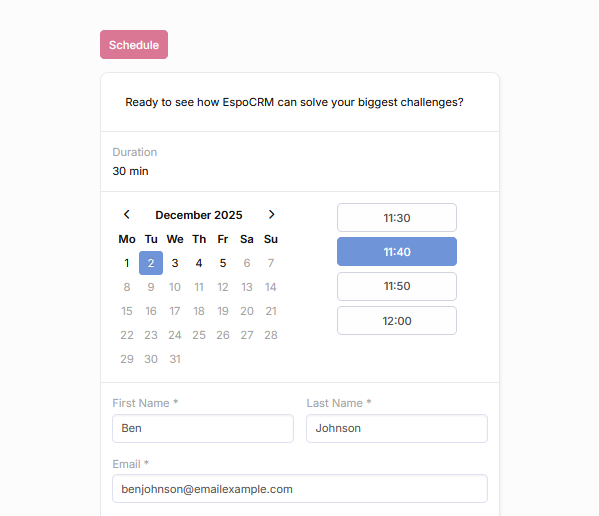
Cost savings through smart scheduling
Most businesses watch their budget closely but let hours disappear into poorly coordinated meetings. A scheduling conflict here, a missing agenda there, someone joining late because they couldn’t find the link, back-to-back meetings that could’ve been emails, or worse – meetings that people forget about entirely.
The problems with most scheduling processes are that they happen through tools that exist in isolation. Meetings are booked in one application, account details are stored in another, past conversations and emails are somewhere else. At least ten minutes are lost every time before you gather the needed information and are prepared to talk.
When Meeting Scheduler is paired with your CRM, all data is centralized automatically. Your meetings are linked to the relevant accounts, leads, contacts, and opportunities. Clients can use scheduler forms to choose a time from the available slots that works best for them. After a meeting request is confirmed and assigned to your employee, everyone gets an automatic email invitation and your staff receives a reminder before it starts. During a meeting, employees can view the history of interactions with a client and have full context for the current conversation. They don’t have to jump across five tools to prepare for a single call. It saves time and resources that can be better allocated to customer success.
Customer-centricity in daily operations
Every business says, “The customer comes first”. But not everyone organizes their work around that idea. Meeting scheduling is one of the processes that shows whether that’s really true. If your sales and support teams are chasing down clients for meeting confirmations over email, frequently double-book meetings, delay conversations because no one is sure who should handle the call, or can’t find the account history without asking around, your business is more process-driven. That’s why your customers often have to repeat themselves and face staff that seems unprepared.
Meeting Scheduler in EspoCRM changes it. Meeting records and requests store all the important details: dates, attendees, answers to the required questions in the booking forms, outcomes, and next steps. The extension features help you create weekly schedules with custom working hours for every employee and set meeting limits to protect your team from overbooking. Required approvals provide hosts with the necessary time to review meeting requests before they’re confirmed. The system logs new events in team calendars, sends email invitations, and uses Priority-Least-Recent or Balanced Methods to assign requests to the available team members automatically. That is how your team gets the needed preparation time and your customers always interact with confident and well-informed staff.
On top of that, a convenient way for customers to book their appointments creates a positive impression about your business and shows that you respect their time and understand their needs. Think about it from their perspective: smooth scheduling will not go unnoticed. Clients don’t have to write several emails to find a suitable time. They can reschedule easily if something comes up and will receive clear confirmations automatically. All these processes signal that your organization operates with professionalism. That impression matters most during the early stages of the relationship, when trust is still being built.
Scheduling automation backs up your business growth
Manual scheduling works for small teams. Everyone knows who talked to which customer last because everyone’s in one room or using the same spreadsheet. But as your company grows, meeting scheduling gets more complicated. Each new client adds more back-and-forth emails, more calendar conflicts to resolve, and more risk of missing follow-ups because they were in someone’s personal calendar and that person quit. What worked with five people falls apart with fifteen.
Meeting Scheduler in EspoCRM helps you stay structured as you scale. The extension handles the increasing complexity by logging new meeting requests, sending email invitations with join links, setting reminders, and distributing meetings across your expanding team automatically. You can easily onboard new team members and immediately specify their availability in the system. It removes many scheduling-related tasks and your team members maintain the same responsiveness and productivity levels whether their workload is fifty meetings a month or five hundred.
Gain insight from every scheduled event
Keeping meetings in a separate calendar app results in losing context. A calendar just tells you when the event happened. But it doesn’t tell you what it meant or what should happen next. To find out these details, you have to look through emails and documents.
When meetings are part of your CRM, this information links up automatically. You open a client record and see every conversation, every decision point, every commitment made. After analyzing this data, you can see patterns that were invisible before:
- Which specific meetings actually lead to closed deals?
- Are you giving enough attention to your most promising accounts?
- Is one team member handling twice as many meetings as everyone else?
- Are your weekly reviews actually happening weekly?
- Are certain clients getting ignored?
This information also reveals strategy-level issues: meetings that consistently run over, team members who are overcommitted, and interactions that happen too rarely to have positive results. Your calendar stops being just a schedule and starts being a source of insight.