
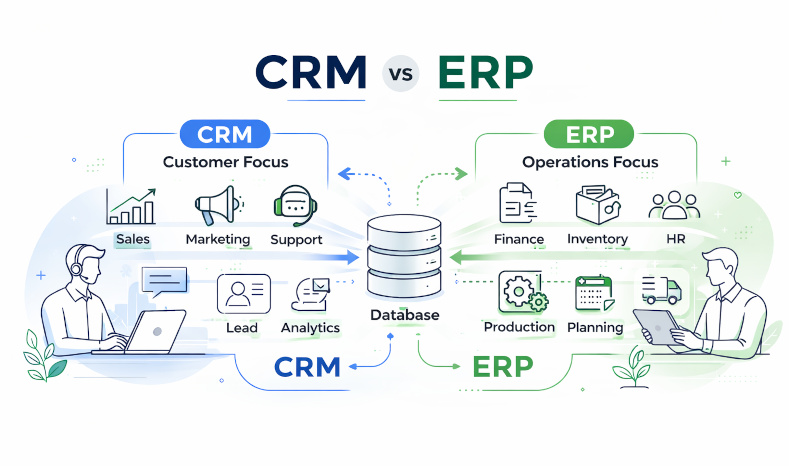
When a business reaches a certain size, the need for structured tools becomes undeniable. As you start looking for software to help your company run more smoothly, CRM and ERP are often the first two systems you’ll encounter. Because they are frequently discussed side by side, it’s no surprise they’re often confused. Both systems organize business data, both generate reports and offer better visibility into your processes, and both promise to make your business processes more structured and efficient.
It’s easy to be misled by the overlapping features of these two solutions. Too often, businesses adopt a CRM or ERP too quickly, simply because they believe it’s required. Later, they realize the tool doesn’t match their actual needs. That’s why we will break down the differences to help you decide whether a CRM, an ERP, or a mix of both is the right fit for your company.
What is a CRM?
A CRM (Customer Relationship Management System) is software designed to track interactions with customers. The primary focus of a CRM is what’s called front-office operations, the parts of your business that interact directly with customers. These operations cover sales, marketing, and customer support teams that are constantly talking to your potential and current clients and need a way to stay coordinated and informed.
On a typical workday, a CRM is a shared workspace. The staff uses it to update the status of a deal in the pipeline, send marketing emails, log a support case, or check a customer’s past preferences to suggest more personalized offers. The main goal of all CRM functionality is to build trust and speed up the process of turning a lead into a long-term customer.
What is an ERP?
An ERP (Enterprise Resource Planning System) is software that runs the operational side of your business. It manages the internal processes that have to happen in your company to deliver products or services to customers.
If a CRM deals with customer-facing operations, ERP is focused on the back-office tasks related to internal resources: budgets, people, and products. These systems are mainly used by finance, operations, supply chain, and HR teams that rarely interact directly with customers.
Day-to-day ERP-related tasks include recording expenses, updating stock levels, managing payroll, and tracking production or delivery statuses. Centralizing these tasks breaks down the walls between different teams. All your core business information flows automatically across the company eliminating a lot of wasted time and costly mistakes.
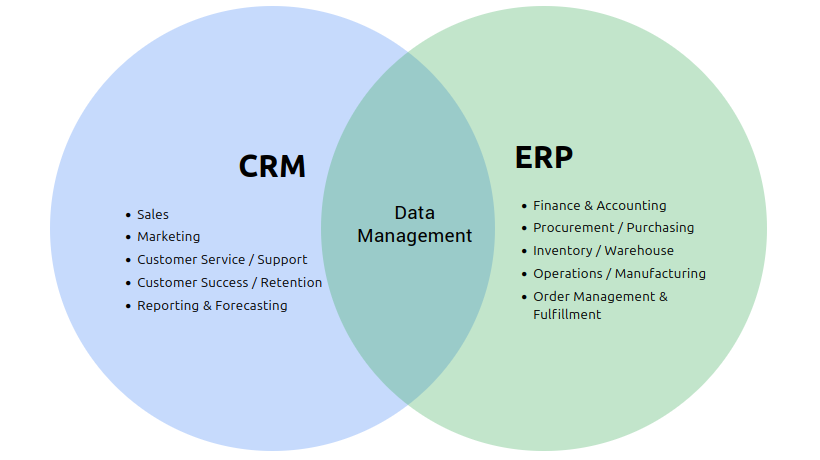
- Sales
- Marketing
- Customer Service / Support
- Customer Success / Retention
- Reporting & Forecasting
- Finance & Accounting
- Procurement / Purchasing
- Inventory / Warehouse
- Operations / Manufacturing
- Order Management & Fulfillment
Management
The impact of CRM implementation
When you implement a CRM, you see improvements in a few key areas of your business:
Centralized customer information
CRM software collects and stores all customer-related data in a single database, which puts an end to long information searching. At the early business stages, customer information is usually scattered across private email inboxes, physical notebooks, various spreadsheets, and folders. A CRM organizes this information and becomes a single place for contact details, communication history, purchase records, support issues, and notes from every interaction. By giving your staff a complete view of every customer, your company appears more professional and organized as every interaction is intentional and well-informed.
Improved sales efficiency
The sales process also becomes more structured and effective. The software ensures that every client gets a consistent experience and turns impersonal sales into relationships. Because sales teams have access to every past interaction and preference, they never have to start a conversation from scratch. A CRM also highlights which deals are stagnant, so managers can intervene before an opportunity is lost. It helps to close deals faster and increase revenue.
Personalized marketing campaigns
Effective marketing is often about relevance and CRM software provides the data to achieve that. You can view the clients who bought a certain product, when they last interacted with your team, or which emails they opened. This information shows patterns. A returning customer already trusts you and might want recommendations based on past purchases. A person checking prices repeatedly is still deciding and might need different information. You can use these insights to segment your audience into target lists and send each group messages that match their interests.
Better customer support
Customers assess support by how quickly you understand their situation and how fast you respond. CRM systems give support teams instant access to customer details and support cases. They see past problems and solutions, understand the customer’s relationship with your company, and can solve issues faster.
Sales analytics
Reports help turn data into useful insights. They can show which lead sources convert more often, how long your sales cycle is, and which sales activities result in closed deals. Even more importantly, they reveal your inefficient processes. If most deals regularly slow down during the demo phase, it’s a sign that your demo needs improvement or you’re introducing it too early. These trends are hard to notice in individual deals, but they become evident when data is analyzed across the entire pipeline.
The impact of ERP implementation
Implementing an ERP system brings positive changes to how a business manages its internal operations:
Streamlined processes across departments
In many companies, sales, warehouse, and accounting departments tend to operate in separate apps independently. An ERP helps by linking these teams and providing a standardized way of sharing data and a standardized process for everyone to process it. It reduces the amount of time spent on internal emails and phone calls to check the statuses of orders or payments and helps stop the errors that happen when information is manually re-entered.
Inventory and supply chain visibility
Better inventory and supply chain management reduces both carrying costs and stock-outs. The system monitors inventory in real time across all your warehouses, physical stores, and other locations. Stock-outs become less common because the system can alert you when levels get low. You can quickly identify which items are selling slowly and adjust supplier orders to match the actual demand.
Improved financial management
Better financial management is the result of having all financial data in one system. An ERP tracks expenses by department or project, generates invoices, records taxes, and helps understand cash flow without manually collecting information from multiple sources. Financial reports that used to take days are generated in minutes, which makes budgeting and forecasting more accurate. Audits also become smoother because all transactions are documented and traceable.
Lower operational costs
The reduction in operational costs comes down to better use of your two most valuable resources: time and data. Data centralization and synchronization allow employees to do higher-value tasks instead. Fewer errors lead to fewer outdated inventory counts, misshipped items, conflicting sales orders, and corrections. Better inventory management reduces carrying costs. More efficient processes provide the ability to handle more volume without proportionally hiring more people.
Data-driven operations
Real-time visibility into internal processes helps managers make informed decisions and changes how teams operate. Goals become more realistic because they’re based on current performance. If order fulfillment takes an average of three days, you know that promising two-day delivery requires process changes first. It also changes how teams respond to problems. When returns increase or warehouse processing slows down, managers spot it right away, identify causes, and make adjustments while the situation is still manageable.
What is the difference between CRM and ERP?
By now, it’s clear that both solutions are designed to improve your business efficiency, but serve completely different business aspects and offer different functionality. Let’s compare them in detail:
Core differences between CRM and ERP
| Aspect | CRM | ERP |
|---|---|---|
| Primary focus | The customer. Managing relationships, sales, marketing, and customer support. | The business. Managing internal processes and resources. |
| Main goal | Increase revenue through better customer relationships | Improve operational efficiency and reduce costs |
| Main direction | Outward – manages customer-facing activities | Inward – manages back-office operations |
| Time perspective | Future revenue, current and future relationships | Current operations and costs |
| Users | Sales, Marketing, Customer Support, and Management Teams | Finance, Accounting, HR, Operations, Supply Chain, Manufacturing, and Warehouse Teams |
| Key features |
|
|
| Data type |
|
|
| Business impact | Higher sales conversion rates and better customer retention | Faster production and order fulfillment time, fewer errors, better collaboration |
| Business problems solved |
|
|
| Implementation | Generally faster; can often be set up for a single department within several hours | More complex; usually involves the whole company and takes longer to install |
| Implementation stage | Common first system for businesses (Useful as soon as you have a sales process) | Larger or operationally complex businesses (Often adopted later as operations grow) |
| Industry specificity | Generally works across industries with minor customization | Often requires industry-specific customization |
| Adoption complexity | Moderate – affects how customer-facing teams work | High – affects processes across the entire company |
| Integration points |
|
|
| Reporting focus | Sales performance, marketing effectiveness, customer behavior, revenue forecasting, team performance | Financial reports, operational metrics, cost analysis, inventory reports |
| Automation focus | Sales follow-ups, reminders, triggering marketing email sequences, scheduling calls, assigning support cases, etc. | Accounting workflows, sales order approvals, auto-reordering stock, payroll calculations |
Which solution does your business need?
Although ERP and CRM solutions bring significant benefits to your company’s processes, companies often start with the system that addresses their most immediate needs first. Analyzing the problems you’re actually experiencing is the best way to determine whether you need a CRM, an ERP, or both.
When should you adopt a CRM for your company?
There’s no magic number of employees or revenue that signals it’s time for a CRM, but there are clear signs that you’ve outgrown simpler methods.
When customer information becomes unmanageable
Early on, you can remember every customer interaction. But notes, different apps, and memory work only for the first few dozen clients. A larger customer base requires a system to track purchase history, preferences, previous issues, and interaction history, so your team can have an informed conversation with any customer.
When the quality of customer experience starts to decline
When your sales, marketing, and support teams aren’t looking at the same data, the reputation of your brand starts to erode in the client’s eyes. A CRM solution stores a detailed profile for every client, so whether it’s their first call or their fiftieth, they receive the same high level of personalized, accurate support.
When you need data to make decisions
If you’re making marketing and sales decisions based on your assumptions, effort is often spent on the wrong activities. Marketing teams bring in leads, but have limited insight into how many turn into paying customers. Sales teams work with those leads, but often without knowing what their initial interests and preferences were. A CRM provides visibility into conversion rates by lead source, average deal size, sales cycle length, and which activities actually correlate with closed deals.
When you hire your second or third salesperson
One person can often manage their sales pipeline with a spreadsheet or even a notebook. Yet, as soon as multiple people are selling, you need coordination. To avoid situations where two people accidentally contact the same lead or opportunities are lost because everyone assumed someone else was handling them, you need a shared CRM system.
Businesses often delay adopting a CRM because they think they’re not ready yet or too small. But the cost of waiting (in lost deals, customers, and as a result revenue) often exceeds the cost of implementation. If you’re experiencing the problems a CRM solves, you’re ready for one.
When should you adopt an ERP for your company?
ERPs are more complex systems and their adoption usually becomes necessary when specific operational issues start occurring regularly. Here are some common situations that signal it’s time.
When departments are using disconnected systems
Early-stage businesses can use separate invoicing apps, spreadsheets for inventory, and CRM software. Updates are easy to share through quick conversations when the team is small. But as you add multiple product lines, multiple locations, or complex manufacturing processes, the amount of errors and time wasted searching for information or re-entering data across systems will eventually stall your growth.
When inventory management becomes chaotic
Ineffective inventory tracking is a direct drain on your cash flow. You’re either constantly running out of items or have too much stock because you don’t have accurate visibility into your inventory levels. A unified ERP system replaces this chaos with real-time accuracy and your capital flows into products that are selling well.
When supply chain coordination is manual and error-prone
Managing your supply chain involves lots of back-and-forth communication to follow up with suppliers on delivery dates, coordinate with the production team on material needs, and update accounting on costs. You’re spending enormous amounts of time on communication and gaining updates that can and should be automated. An ERP connects these functions so information syncs automatically.
When you see the costly error patterns
You notice recurring problems: shipments going to the wrong address because someone entered it differently in two systems, invoices with incorrect pricing because the price list in accounting doesn’t match the one sales is using, and inventory shortages because ordering didn’t know about committed stock. These errors cost money and customers. They happen because information exists in multiple places and gets out of sync.
Overall, ERPs are expensive and complex. Implementing one before you actually need it adds complexity without a corresponding benefit. If your operations are relatively simple and current systems work fine, wait. But don’t delay until operational inefficiencies are actively preventing growth or creating a significant financial strain.
When is implementing both systems a great option?
Business maturity is often reflected in the tools a company uses. Most companies evolve from needing neither system, to needing a CRM, and to needing both CRM and ERP.
Today, the lines between these tools are blurring. Many solutions offer CRM and ERP capabilities in a single system which creates a complete operational view of your business. This unified approach works perfectly for businesses where customer interactions directly trigger operational processes. For example, when a customer places an order, the CRM records it and the built-in inventory management tools track fulfillment, inventory levels, and shipping.
The reduction of manual work and errors after adopting a combined solution is substantial. No one needs to re-enter order details; inventory updates happen automatically when orders ship; and customer records reflect the real-time status of their orders without anyone updating multiple systems.