Bring project management into your CRM One system, many capabilities
Why you might need it
-
No system switching
When project management is part of your CRM, your team does not need to switch between separate tools.
-
Collaboration made simple
The tool is collaboration-friendly by design. Each project has its own team, while multiple collaborators can work on the same task.
-
Flexible access control
Fine-grained access control, allowing the same users to have completely different access rights across different projects. For example, you can allow a user to assign tasks to other users even if that user does not have assignment permissions in the CRM. Or give a user manager rights only in a specific project while keeping their CRM access read-only.
-
Configurable task pipelines
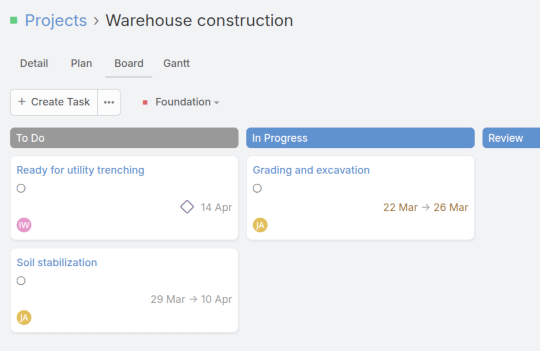
While regular tasks in the CRM have a fixed set of available statuses, in project management each project can have its own list of stages. For example, one project may use the standard set To Do, In Progress, Review, and Completed, while another project may only have the stages Open and Closed.
Plan, Track, and Deliver
Project Essentials
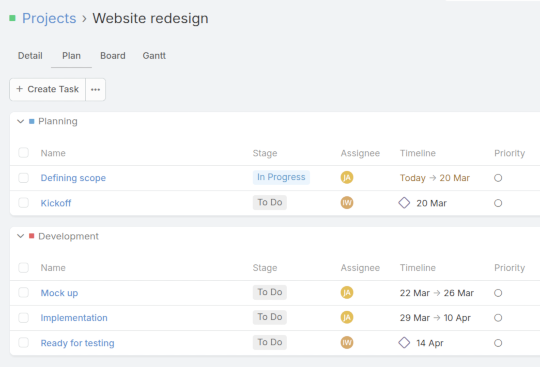
- Projects · Organize your team work around projects
- Tasks · Assign tasks within a project and track their progress
- Milestones · Designate significant points in the project’s timeline
Boards
Each project features a Kanban-style view where tasks appear as cards organized into columns. Customize the column stages for each project to match the way your team works.
Gantt Chart
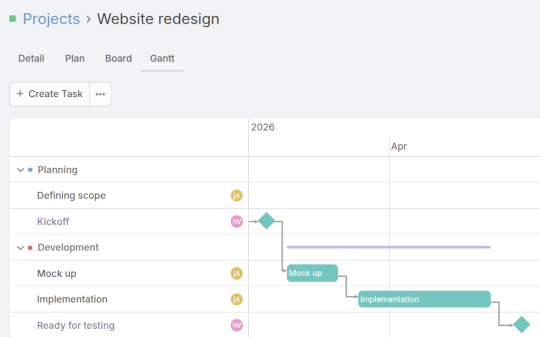
Use the Gantt chart view to plan your project timeline, schedule tasks, and clearly see how work progresses over time.